

For Final Cut Pro editors

Your next edit
gets a head start.

Silences, breaths, retakes. Let MasterCut handle the first cut. Save your time for bringing the video to life.

Cut timeline
Kept Removed
3:003:00Original video12 cuts
Original preserved Local on your Mac
EDIT FROM THE TRANSCRIPT

Cut your video
through text.

A repetition, a word, a whole sentence. Select a passage in the transcript and decide what stays. The video follows every cut.

01

Find the words. Find the moment.Jump to the passage you’re reading and check it in the preview.

02

Bring a passage back.Restore a cut passage right from the transcript, whenever you want.

Text and video, side by side in MasterCut.
Enlarged screenshot of the MasterCut interface.
EDIT TO YOUR VIDEO’S RHYTHM

Make the cuts
your own.

Choose a starting point. Fine-tune the pauses. Teach it your preferences.
MasterCut makes room for the way you edit.

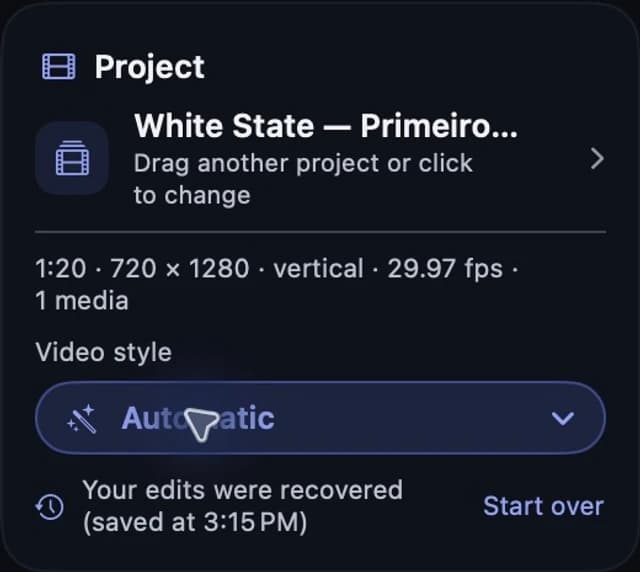
Actual video style selector in MasterCut’s project panel.MasterCut screenshot
01 / THE STARTING POINT

Different subjects. Different cuts.

Talking to camera, a directed Reel, a screen tutorial or a conversation. Choose a video style to guide MasterCut’s decisions from the first cut.

To cameraReelsTutorialConversation

Each style has its own editing rules. Start with Automatic and adjust from there.

Edit this way
FROM FINAL CUT. BACK TO FINAL CUT.

Keep editing
where you feel at home.

Your timeline comes back as a new version, ready for the finishing touches. Your original project stays intact.

  1. 01

    Bring your timeline.

    Drag in your Final Cut project or import the FCPXML.

  2. 02

    Review the cuts.

    Listen, adjust and keep the passages you want.

  3. 03

    Bring the video to life.

    Send it to Final Cut and carry on with color, music, captions and finishing.

MacBook com uma sequência de vídeos e um cadeado roxo, representando o processamento local no Mac.
YOUR FOOTAGE STAYS WITH YOU

Your client’s video
stays on your Mac.

The unreleased interview. The next launch. The lesson that hasn’t aired yet. MasterCut processes video and audio on your computer, without uploading the recording to edit in the cloud.

An internet connection is needed to download the app and models, install updates and validate your account. Beta versions have their own reporting terms, shown in the app.
From the first cut to Final Cut

See MasterCutin action.

Press play. Follow the cuts, the review and the return to Final Cut.

Meet MasterCut

Open MP4 video
LESS REPETITIVE WORK, ON EVERY PROJECT

One purchase.
Plenty of cuts.

Make MasterCut part of your workflow. From the first cleanup to the new timeline, free up time for the edit that carries your signature.

Already using MasterCaption?Prepare your cuts with MasterCut. Then bring your captions to life.Explore MasterCaption

MasterCut

Lifetime license for Mac

One-time payment
Launch priceUS$ 49.90Through December 31, 2026.
From January 1, 2027, US$ 99.
  • Silence, breath and noise cleanup
  • Pacing adjustments and cut review
  • Script-based and AI editing in beta
  • Learns your preferences
  • A new project version in Final Cut
  • Local processing on your Mac

Lifetime license with future updates included.

Get MasterCut
Try free for 7 days

Create your account and download the app. No card and no automatic charge.

Currency and applicable taxes will be confirmed at checkout.

Already have access? Sign in to your account
BEFORE THE FIRST CUT

Let’s answer
your questions.

Your next video
is off to a good start.

Make time for what needs your eye.

Try free for 7 days Made for Mac. Built for editors.